


How To Insert a Promo Code

If You Signed Up Before October 2023
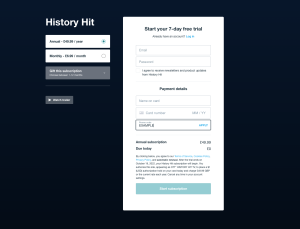
Inserting a promo code at sign up
1. Go to the sign up page
2. Select “Monthly” or “Annual” depending on the offer
3. Enter in your personal details
4. Enter promotional code in “Promo code” box and hit APPLY
5. Click “Start subscription”
Note: When entering in a pre-paid annual code you will still be required to enter your card details, although you won’t be charged again.
Inserting a promo code as a current subscriber
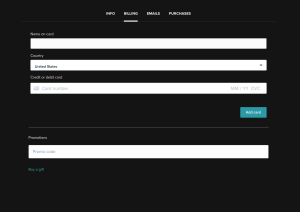
1. Log in to your account
2. Go to the BILLING PAGE of your account settings
3. Enter promotional code in the “Promo code” box and hit APPLY
Note: When entering a code ensure that your account is on the correct plan to redeem it (Monthly or Annual)
If You Signed Up After. October 2023
Inserting a promo code at sign up
- Go to historyhit.com/subscription/
- Enter an email and password combination
- On the payment page, at the top of the page, on mobile you’re presented with an box that says “add code”. Click on this and enter your code. On desktop, on the left hand side, you’re presented with an option to “add code”. Click on this and add your code.
- Complete your payment information
Inserting a promo code as a current subscriber
- Go to https://www.historyhit.com/dashboard/account/ and sign in
- Under your details, there’s an option to enter a code.
- Enter your relevant code and click Save Changes
- Your code has been applied